

In this article, we explore how to make social listening more efficient by building an AI-powered response assistant. Without writing any code, you'll learn how to automate responses, adapt your brand's tone of voice across different platforms, and make the most of valuable engagement opportunities.
Introduction
While working on social listening at E-goi, I kept running into the same challenge: there were plenty of opportunities to engage in conversations, respond to brand mentions, join comparisons, and participate in relevant discussions—but very few practical tools that made it easy to respond quickly and consistently.
This naturally raises an important question: What is social listening, and why does it matter?
In simple terms, social listening is the process of monitoring and analysing online conversations to understand what people think about a brand, its competitors, or the wider market. Unlike basic social media monitoring—which focuses on surface-level metrics such as likes or comments, social listening looks at the sentiment and context behind those conversations. This enables businesses to uncover genuine customer insights, identify emerging trends, anticipate reputation issues, discover organic brand advocates, and ultimately improve the customer experience.
Identifying these opportunities is relatively straightforward. The real challenge is acting on them consistently and at scale without sacrificing speed or relevance.
In practice, many valuable engagement opportunities are missed because teams lack the time, organisation, or structured workflows needed to respond effectively.
To solve this problem, I decided to build a response assistant using Lovable, without writing any code.
In this article, I’ll explain how I built this solution and how you can apply the same approach to improve your own social listening workflow.
The Challenge of Turning Social Listening into Action
Social listening has become an essential practice for brands that want to understand what’s being said about them and their industry.
However, there’s a clear gap between identifying opportunities and acting on them.
Finding a relevant article, social media post, or discussion is only the first step. The real opportunity lies in how you respond:
- Join the conversation;
- Add meaningful value;
- Position your brand strategically.
Without a structured process, this quickly becomes a manual, time-consuming task that’s difficult to scale, especially as the number of opportunities grows.
How I Built the Tool with Lovable
To develop this solution, I used Lovable, an AI-powered platform that allows you to build lightweight applications and automations using prompts, without writing any code.
The first step was to define a strategy for using the platform efficiently. Lovable operates on a daily credit system (in my case, six credits per day), with every creation or modification consuming part of that allowance.
To make the most of those credits, I started by using Chat Mode, where I could plan, refine, and iterate on the complete prompt before generating the application itself. This allowed me to optimise the final prompt without wasting credits on unnecessary revisions.
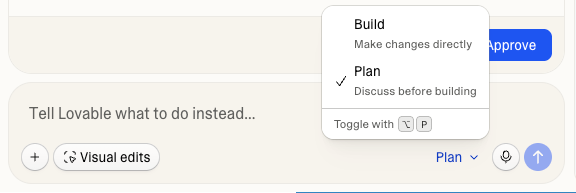
Com o objetivo bem definido, “criar uma ferramenta de apoio à resposta em social listening” comecei por descrever exatamente o que pretendWith the objective clearly defined, to build a social listening response assistant, I started by describing exactly what I wanted.
I explained who my company is, defined our target audience (including our personas and Ideal Customer Profile), shared our brand voice guidelines (whether we address people informally or formally, the tone we use, and our communication style), provided examples of responses I liked as a starting point, and included any other information I felt would help the AI understand how we typically communicate.
I then asked Lovable to include the following features:
- A text box where I could paste the content of the post I’d found;
- A dropdown to select the social platform (such as LinkedIn, Reddit, or TikTok), allowing the generated response to adapt to each platform’s conventions, including character limits and writing style;
- A field to identify who I was responding to´for example, an existing customer, a prospect, a partner, or a supplier;
- An option to classify the sentiment of the original post (positive, negative, or neutral);
- A setting to choose the tone of the response, whether professional, technical, or more conversational.
This last feature proved particularly valuable, as communication styles vary considerably across platforms.
For example, a more relaxed and approachable tone tends to perform better on TikTok, whereas Reddit often rewards responses that are more direct and technically detailed.
Of course, the tool wasn’t perfect on the first attempt.
One of Lovable’s biggest strengths is that it encourages continuous iteration, especially since credits are refreshed daily.
As I began using the assistant in real social listening scenarios, I quickly identified opportunities for improvement.
One of the first additions was an editable response box, allowing me to refine the generated copy before publishing. This proved essential whenever the initial suggestion wasn’t quite aligned with what I wanted to communicate.
Later, another improvement became apparent.
In some situations, it made more sense to participate in the conversation as an individual rather than as the brand itself.
Instead of relying solely on manual editing, I decided to improve the assistant.
I returned to Lovable and introduced a new option that lets users choose between:
- Comment as the brand
- Comment as an individual user
With this simple addition, the assistant automatically adjusts both the tone and framing of the response before generating any copy, ensuring it matches the type of presence selected.
Practical Use Cases
Imagine someone replies to one of your social media posts, whether positively or negatively, or comments on someone else’s post mentioning your brand.
Instead of relying on a generic response that may vary depending on which team member replies, you can use the assistant to generate a response tailored to the sentiment of the conversation while maintaining a consistent brand voice and communication standard.
Another common scenario is discovering an article or social media post comparing several companies or services in your industry, but your brand isn’t mentioned.
This is a classic social listening opportunity.
With the response assistant, all you need to do is:
- Paste the content of the post;
- Select the social platform;
- Choose the type of author you’re responding to;
- Select the desired tone of voice;
- Decide whether you’d like to comment as the brand or as an individual.
The assistant then generates a response automatically, which you can review and edit before publishing.
This significantly reduces response times while ensuring your communications remain consistent, relevant, and aligned with your brand guidelines.
Conclusion
Social listening isn’t just about monitoring conversations, the real value lies in acting on the opportunities you uncover.
Building a response assistant transforms what would otherwise be a manual and difficult-to-scale process into one that’s structured, efficient, and strategic. It also helps ensure that, regardless of who responds, every interaction maintains a consistent tone of voice and reflects the brand’s communication standards.
With accessible AI tools like Lovable, it’s now possible to build solutions tailored to your team’s specific needs without requiring advanced technical or programming skills.
Ultimately, success in social listening isn’t just about finding opportunities, it’s about being ready to make the most of them at exactly the right moment.
If you have any questions or would like to share your own version of this tool, feel free to leave a comment below.